
A Marketing Campaign template gives you the structure and clarity you need for your upcoming projects. These tools help keep your work on track with your goals and offer a detailed plan for tracking results. Whether it is a quick email or a long project, a template can simplify your work. In a busy digital world, having a roadmap is the only way to ensure your message reaches the right people without wasting your budget. Let’s look at some of the best free options you can use today to streamline your workflow and improve your team’s efficiency.
Monday.com: Manage Your Marketing Campaign
This platform lets you manage every project in one place. It is highly visual, which makes it great for teams that need to see their progress at a glance. You can track budgets, files, and content easily within the interface. With built-in tools, you can create tasks, set dependencies, and stay organized throughout the week. If you currently use Excel or Google Sheets, you can import your data here in just a few clicks. The timeline view keeps your Marketing Campaign in sight and helps tasks move smoothly through various stages of production. Many users love the automation features that send alerts when a deadline is near.
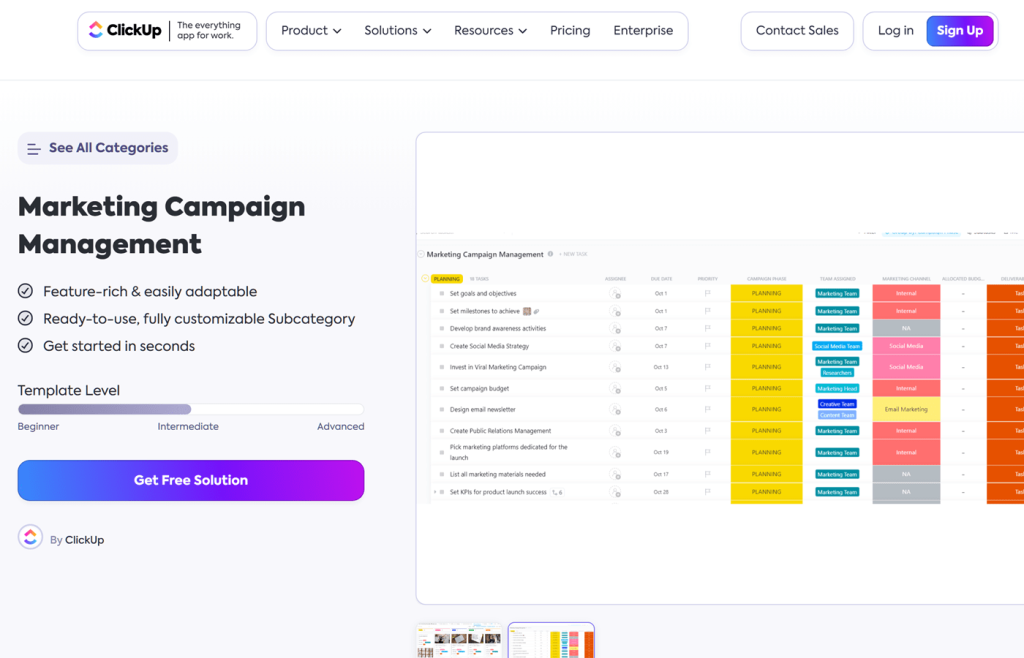
ClickUp: Better Planning
ClickUp offers a strong Marketing Campaign template for planning and execution. It has one of the most generous free plans on the market, which lets you manage many projects at once without paying a fee. The template includes budget tracking, time estimates, and custom fields to keep things structured. You can map out your work, set deadlines, and see your progress clearly using different views like lists or boards. It is built for deep customization, meaning you can change the status of tasks to fit your specific internal process.
Asana: Simplify Your Marketing Campaign
Ideal for small teams, Asana is very easy to use and requires almost no training. Its free plan works for up to 10 users, making it perfect for startups. Asana shows how different tasks connect, ensuring that no one misses a step. You can use boards or calendars to see your work and move tasks around as priorities shift. It is simple to turn a basic idea into a full Marketing Campaign with clear steps and assigned owners. By breaking large goals into small milestones, Asana helps teams stay motivated and focused on the finish line.
Notion: Strategy Tools
Notion combines notes, databases, and task management into one workspace. If you work alone or in a very small group, the free plan is excellent for long-term use. This Marketing Campaign template focuses on strategy and high-level goals. It helps you identify your audience, brand voice, and success metrics right from the start. You can also customize it to track an ongoing project as it grows by adding new pages for meeting notes or asset storage. Because it is so flexible, Notion is a favorite for content creators who need to write and plan in the same app.
Confluence: Team Collaboration
Confluence is a great place for team documents, SOPs, and shared files. The Marketing Campaign template here is simple but extremely useful for documentation. You can outline your strategy, budget, and roadmap with ease, ensuring everyone is on the same page. It is a perfect tool for collaborating with a team on a shared document because it allows for real-time editing and comments. If your company already uses Jira or Trello, Confluence will fit perfectly into your existing ecosystem.
Google Sheets and Excel Templates
Sometimes a basic sheet is all you need for a Marketing Campaign. For one-off projects or simple tracking, spreadsheets are still a powerful choice. Smartsheet offers a free Excel tool for tracking your budget and costs in real-time. It helps you see if your project is making money by automatically calculating your return on investment. HubSpot also has a Google Sheets tool to help you share plans and roles with your team quickly without needing to learn a new software platform.
Canva: Visual Asset Planning
While often known for design, Canva offers a Marketing Campaign template for visual planning. This is where you can map out what your ads, social posts, and banners will look like. Having a visual guide ensures that your branding remains consistent across every channel. It allows teams to comment on designs and approve them before they go live, which saves time during the final execution phase.
Key Elements of a Successful Plan
In every Marketing Campaign, remember to define your goals, audience, and budget. You should also decide which channels—like email, social media, or search ads—will bring the best results for your specific product. Documenting these facts helps your team work together and prevents confusion later on. Without a clear plan, it is easy to lose track of your spending or miss important deadlines.
Running more than one Marketing Campaign at once can bring quicker results and help you test different ideas. You can use email for old customers and social media for new ones at the same time. Just be careful not to send too many messages, as this can tire your audience and lead to lower engagement. Using a Marketing Campaign template ensures that even when you are busy, your quality stays high.
By using these free tools, you can spend less time on administration and more time on creativity. A well-organized Marketing Campaign is much more likely to hit its targets and grow your business. Start with one template today and see how much time you can save in your next big project.
To order our software development and system administration services, please visit our contact page.